
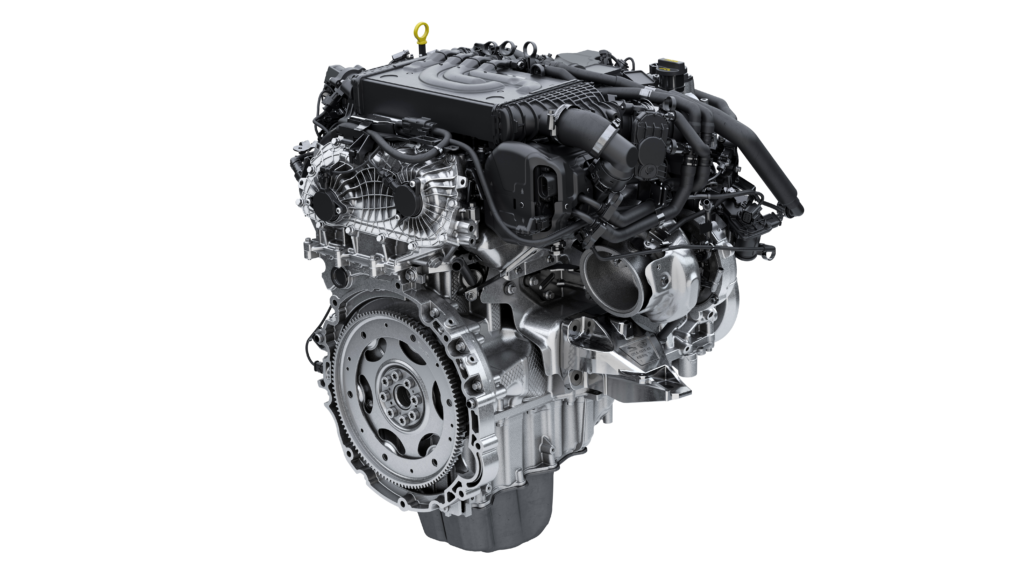
Range Rover Engines for Sale in 2025: Restoring Power with Quality Options

Range Rover vehicles, from the luxurious Range Rover to the versatile Evoque, are renowned for their blend of opulence and off-road prowess, driven by engines that deliver exceptional performance. When issues like turbo wear or timing chain failure arise, replacing the engine can restore your vehicle’s iconic capability. In 2025, the UK market offers a robust selection of new, used, and reconditioned Range Rover engines, catering to models like the Range Rover, Sport, Velar, and Evoque. This blog explores the Range Rover engine for sale lineup, reasons for replacement, available engines for sale, cost factors, sourcing strategies, and maintenance tips to keep your Range Rover ready for any adventure.

Range Rover Engine Lineup

Range Rover’s 2025 engines power models like the Range Rover, Range Rover Sport, Velar, and Evoque, typically paired with automatic transmissions and all-wheel drive for seamless performance.

Petrol Engines

  • 2.0L Turbocharged Inline-4 (Ingenium): Powers the Evoque and Velar, delivering up to 247 hp and 365 Nm of torque, offering efficiency and agility for urban driving.
  • 3.0L Turbocharged Inline-6 (Ingenium with Mild-Hybrid): Found in the Range Rover, Sport, and Velar, producing up to 395 hp and 550 Nm, balancing power and efficiency.
  • 5.0L Supercharged V8 (AJ133S): Fuels high-performance Range Rover and Sport models, delivering up to 557 hp and 700 Nm for exhilarating acceleration.

Diesel Engines

  • 2.0L Turbo-Diesel Inline-4 (Ingenium): Powers the Evoque and Velar, producing up to 204 hp with high torque for towing and efficiency.
  • 3.0L Turbo-Diesel Inline-6 (Ingenium): Found in the Range Rover, Sport, and Defender, offering up to 350 hp and 650 Nm for robust towing and off-road capability.

Hybrid and Electric Engines

  • 2.0L Plug-in Hybrid (PHEV): Combines a petrol engine with an electric motor in the Evoque, Velar, and Range Rover, delivering up to 398 hp and 33 miles of electric range.
  • 3.0L Plug-in Hybrid (PHEV): Found in the Range Rover and Sport, offering up to 434 hp and enhanced efficiency for eco-conscious drivers.

Why Buy a Range Rover Engine?

Engine replacement may be necessary due to:

  • Timing Chain Stretch: Common in 5.0L V8 engines, causing rattles or misfires.
  • Turbo Wear: Affects 2.0L and 3.0L Ingenium engines, leading to power loss or smoke.
  • Diesel Particulate Filter (DPF) Clogging: Diesel engines require highway driving to regenerate filters; neglect reduces efficiency.
  • Supercharger Issues: 5.0L V8 engines may experience bearing wear, impacting performance.
  • Oil Leaks: Valve cover or oil pan gasket leaks in V8 engines risk further damage.
  • Hybrid Battery Degradation: PHEVs may face reduced electric range or software issues.

When repairs become costly, a new, used, or reconditioned engine is a practical solution to restore performance.

Range Rover Engines for Sale

New Engines

  • Benefits: Factory-fresh quality, maximum reliability, and extended warranties (2-5 years), ideal for newer models like the 2025 Range Rover L460.
  • Drawbacks: High cost (£5,000-£20,000) and potential supply delays for older models (e.g., L322).

Used Engines

  • Benefits: Budget-friendly (£800-£5,000), widely available through salvage yards and online platforms.
  • Drawbacks: Risk of hidden defects, uncertain maintenance history, and short warranties (3-6 months).
  • Sources: Quarry Motors, 1stchoice.co.uk, and breakerlink.com offer low-mileage options.

Reconditioned Engines

  • Benefits: Restored to near-new condition with upgraded components (e.g., reinforced timing chains, improved turbo seals), offering reliability, 1-3 year warranties, and eco-friendly core reuse.
  • Drawbacks: More expensive than used engines (£1,200-£10,000), requires professional installation.
  • Process: Includes diagnosis, disassembly, cleaning, machining, component upgrades, reassembly, and rigorous testing (dyno, leak-down, emissions).

Availability

  • Petrol: 2.0L and 3.0L Ingenium, 5.0L V8 for Evoque, Velar, Range Rover, and Sport.
  • Diesel: 2.0L and 3.0L Ingenium for Evoque, Velar, and Defender.
  • Hybrid: PHEV units for Evoque, Velar, and Range Rover, focusing on the petrol component.

Cost Factors for Range Rover Engines

Costs vary based on:

  • Engine Type: V8 and hybrid engines are pricier due to complexity; four- and six-cylinder engines are more affordable.
  • Condition: New engines are the most expensive, followed by reconditioned, with used engines being the cheapest but riskiest.
  • Supplier Location: UK suppliers like Quarry Motors, Apex Engines, or Vogue Technics offer competitive pricing, often with free regional shipping; international sourcing adds delivery costs.
  • Labour: Rates vary (£500-£2,000 in the UK), with dealerships charging more than independent mechanics.
  • Additional Parts: Belts, hoses, coolant, and oil add £100-£600; diagnostics and core return charges may apply.
  • Special Offers: Discounts for military personnel or online bookings can reduce costs.

Price Ranges (UK, 2025):

  • 2.0L Ingenium (Petrol/Diesel):
    • New: £4,000-£6,000
    • Used: £800-£2,000
    • Reconditioned: £1,200-£3,000
  • 3.0L Ingenium (Petrol/Diesel):
    • New: £6,000-£9,000
    • Used: £1,500-£3,500
    • Reconditioned: £2,500-£5,000
  • 5.0L V8:
    • New: £8,000-£15,000
    • Used: £2,500-£5,000
    • Reconditioned: £4,000-£7,000
  • PHEV (2.0L/3.0L + Electric):
    • New: £7,000-£12,000
    • Used: £2,000-£5,000
    • Reconditioned: £3,000-£6,000
  • Total Cost (with Labour and Parts): £1,500-£12,000

Sourcing Range Rover Engines

Trusted sources ensure quality:

  • UK Specialty Suppliers: Quarry Motors, Apex Engines, and Vogue Technics offer reconditioned and used engines with warranties (3 months to 3 years), often with military discounts.
  • Online Marketplaces: eBay UK, PartsGateway, and 1stchoice.co.uk list new, used, and reconditioned engines; verify seller ratings and maintenance records.
  • Certified Land Rover Shops: UK specialists ensure compatibility for Evoque, Velar, Range Rover, and Sport, often providing fitting services.
  • Salvage Yards: Breakerlink.com and local breakers offer used engines at lower costs, with nationwide delivery.

Request rebuild documentation for reconditioned engines or mileage records for used ones. Ensure compatibility with your vehicle’s year, chassis (e.g., L322, L405, L460), and electronics (e.g., ECU settings).

Key Considerations for Purchase

  • Compatibility: Match the engine to your model’s specifications (e.g., 3.0L Ingenium for Range Rover Sport, 2017-2022).
  • Warranties: Opt for suppliers offering at least one-year warranties for reconditioned engines or 3-month warranties for used ones.
  • Supplier Reputation: Choose trusted providers like Quarry Motors or Apex Engines with strong reviews.
  • Professional Installation: Complex Range Rover electronics require skilled mechanics.
  • Vehicle Value: Compare costs to your vehicle’s resale value for a sound investment.

Maintenance Tips for Range Rover Engines

  • Oil Changes: Use manufacturer-approved synthetics (e.g., 5W-30) every 5,000-7,500 miles to protect turbo and supercharger components.
  • DPF Regeneration: Drive diesels at highway speeds weekly for 20-30 minutes to maintain filter health.
  • Cooling System: Monitor coolant levels to prevent overheating, especially in V8s.
  • Hybrid Maintenance: Charge PHEV batteries regularly and update software.
  • Diagnostics: Use Land Rover-specific tools (e.g., SDD) to catch issues early.

Voices from the Community

Range Rover forums praise the 5.0L V8’s power and the 3.0L diesel’s torque for off-road feats, but warn of timing chain issues in V8s and DPF clogs in diesels. Owners laud reconditioned engines for their reliability and cost savings, while used engines are popular for budget fixes, with low-mileage units lasting years with proper care. Compatibility checks and professional installation are critical for success.

Conclusion

Range Rover engines for sale in 2025, from the efficient 2.0L Ingenium to the powerful 5.0L V8 and hybrid PHEVs, offer solutions to restore your vehicle’s performance. Reconditioned engines, sourced from reputable UK suppliers like Quarry Motors or Apex Engines, provide the best balance of affordability, reliability, and sustainability, while used engines cater to budget-conscious owners. By ensuring compatibility, verifying condition, and embracing diligent maintenance, owners can revive their Range Rover whether an Evoque, Velar, or Sport-for countless adventures, from urban streets to rugged trails.

11 thoughts on “Range Rover Engines for Sale in 2025: Restoring Power with Quality Options”

  1. rufus windows 11 Rufus is a compact, no-cost, open-source utility created to create bootable USB drives. It is used to prepare a USB flash drive that can set up an operating system, launch diagnostic tools, or start a recovery environment. The program works without installation and can be opened immediately after downloading.

    The main function of Rufus is to create bootable USB media from ISO images quickly and reliably. This allows users to install or run operating systems directly from a USB flash drive without the need for DVDs. The tool supports a broad selection of operating systems and service utilities, which makes the program useful for both regular users and system administrators.

    Rufus runs on computers with Microsoft Windows, starting from Windows 7. Both 32-bit and 64-bit versions are supported, and there is also a version available for ARM64 architecture.

    The software allows users to create bootable USB drives from many different ISO images. It can be used to prepare a USB drive for installing Windows 11, Windows 10, Windows 8.1, or Windows 7, as well as various Linux distributions. Rufus also works with DOS systems and other recovery or maintenance tools commonly used for troubleshooting computers.

    One of the integrated features of Rufus is the ability to download official Windows ISO images directly from Microsoft servers. This allows users to obtain original installation images for Windows 8.1, Windows 10, and Windows 11 without searching for them on third-party websites.

    In addition to creating bootable drives, Rufus can format USB devices. It supports several file systems including FAT32, NTFS, exFAT, UDF, and ReFS. This flexibility allows the USB drive to be prepared for different use cases and compatibility requirements.

    Rufus supports both legacy BIOS systems and modern UEFI environments. Because of this, bootable drives created with Rufus can work on older computers as well as newer systems that use UEFI and Secure Boot.

    Another feature included in Rufus is Windows To Go support. This option allows users to run a full Windows environment directly from a USB drive. It can be useful for testing systems, performing maintenance, or working on multiple computers without installing Windows on the internal drive.

    Rufus also provides the option to bypass certain Windows 11 installation requirements. When creating an installation USB, the program can disable checks for TPM 2.0, Secure Boot, and minimum RAM requirements. This makes it possible to install Windows 11 on computers that would otherwise not meet the official hardware requirements.

    One of the reasons Rufus has become popular is its speed and simplicity. The program is extremely small, about 1.9 MB in size, and runs as a portable application without installation. It is distributed under the GPL v3 open-source license, supports more than 70 languages, and contains no advertisements, bundled software, or tracking components.

    Rufus works with a large number of ISO images. These include multiple versions of Windows, Windows Server editions, FreeDOS, and various system tools such as GParted, Hiren’s Boot CD, Parted Magic, and Clonezilla. Because of this wide compatibility, the program can be used not only for installing operating systems but also for disk management, data recovery, and system maintenance tasks.

    To use Rufus, a computer running Windows 7 or later and a USB flash drive are required. The program does not need to be installed. Users simply download the executable file, run it, select the ISO image they want to use, and create a bootable USB drive. Due to its simplicity, speed, and reliability, Rufus remains one of the most widely used tools for creating bootable USB drives.

  2. мелбет зеркало рабочее на сегодня скачать бесплатно
    Установить Melbet: APK, iPhone и компьютер

    Приложение Melbet включает букмекерскую контору и казино в едином приложении. Доступны live-ставки, казино-игры, онлайн-трансляции, аналитика и быстрые финансовые операции. Загрузка занимает 1–2 минуты.

    Android (APK)
    Скачайте APK с официального сайта, откройте файл и подтвердите установку. Если требуется включите разрешение на установку из неизвестных источников, затем авторизуйтесь.

    iOS (iPhone)
    Перейдите в App Store, найдите «Melbet», выберите «Получить», после установки выполните вход.

    ПК
    Откройте официальный сайт, войдите в личный кабинет и создайте ярлык на рабочий стол. Веб-версия работает как отдельное приложение.

    Функционал
    Live-ставки с обновлением коэффициентов, казино и слоты, просмотр матчей, аналитические данные, уведомления о матчах, быстрая регистрация и круглосуточная служба поддержки.

    Бонусы
    После установки доступны приветственный бонус, акционные коды и фрибеты. Условия зависят от региона.

    Безопасность
    Загружайте только с официальных источников, проверяйте домен, не сообщайте данные доступа третьим лицам и активируйте двухфакторную аутентификацию.

    Загрузка выполняется быстро, после чего доступен весь функционал Melbet.

  3. rufus Rufus remains a compact, free, open-source utility designed to make bootable USB drives. It is used to prepare a USB flash drive that can install an operating system, launch diagnostic tools, or boot into a recovery environment. The program requires no installation and can be launched immediately after downloading.

    The main purpose of Rufus is to create bootable USB media from ISO images with speed and stability. This allows users to install or run operating systems directly from a USB flash drive without the need for DVDs. The tool works with a wide range of operating systems and service utilities, which makes the program useful for both regular users and system administrators.

    Rufus works on computers with Microsoft Windows, starting from Windows 7. Both 32-bit and 64-bit versions are supported, and there is also a version available for ARM64 architecture.

    The software allows users to create bootable USB drives from many different ISO images. It can be used to prepare a USB drive for installing Windows 11, Windows 10, Windows 8.1, or Windows 7, as well as various Linux distributions. Rufus also works with DOS systems and other recovery or maintenance tools commonly used for troubleshooting computers.

    One of the integrated features of Rufus is the ability to download official Windows ISO images directly from Microsoft servers. This allows users to obtain original installation images for Windows 8.1, Windows 10, and Windows 11 without searching for them on third-party websites.

    In addition to creating bootable drives, Rufus can format USB devices. It supports several file systems including FAT32, NTFS, exFAT, UDF, and ReFS. This flexibility allows the USB drive to be prepared for different use cases and compatibility requirements.

    Rufus supports both legacy BIOS systems and modern UEFI environments. Because of this, bootable drives created with Rufus can work on older computers as well as newer systems that use UEFI and Secure Boot.

    Another feature included in Rufus is Windows To Go support. This option allows users to run a full Windows environment directly from a USB drive. It can be useful for testing systems, performing maintenance, or working on multiple computers without installing Windows on the internal drive.

    Rufus also provides the option to bypass certain Windows 11 installation requirements. When creating an installation USB, the program can disable checks for TPM 2.0, Secure Boot, and minimum RAM requirements. This makes it possible to install Windows 11 on computers that would otherwise not meet the official hardware requirements.

    One of the reasons Rufus has become popular is its speed and simplicity. The program is extremely small, about 1.9 MB in size, and runs as a portable application without installation. It is distributed under the GPL v3 open-source license, supports more than 70 languages, and contains no advertisements, bundled software, or tracking components.

    Rufus works with a large number of ISO images. These include multiple versions of Windows, Windows Server editions, FreeDOS, and various system tools such as GParted, Hiren’s Boot CD, Parted Magic, and Clonezilla. Because of this wide compatibility, the program can be used not only for installing operating systems but also for disk management, data recovery, and system maintenance tasks.

    To use Rufus, a computer running Windows 7 or later and a USB flash drive are required. The program does not need to be installed. Users simply download the executable file, run it, select the ISO image they want to use, and create a bootable USB drive. Due to its simplicity, speed, and reliability, Rufus remains one of the most widely used tools for creating bootable USB drives.

  4. мелбет казино скачать на андроид
    Установить приложение Melbet: APK, iOS и компьютер

    Приложение Melbet включает букмекерскую контору и казино в одном интерфейсе. Пользователю доступны live-ставки, слоты, прямые трансляции, статистика и операции по счёту. Установка занимает несколько минут.

    Android (APK)
    Загрузите APK с официального источника, откройте файл и завершите установку. Если требуется включите разрешение на установку из неизвестных источников, затем войдите в аккаунт.

    iOS (iPhone)
    Откройте App Store, найдите «Melbet», нажмите «Получить», после установки выполните вход.

    ПК
    Откройте официальный сайт, войдите в личный кабинет и создайте ярлык на рабочий стол. Браузерная версия функционирует как отдельное приложение.

    Функционал
    Live-ставки с мгновенным обновлением линии, казино и слоты, прямые трансляции, подробная статистика, уведомления о матчах, быстрая регистрация и поддержка 24/7.

    Бонусы
    После загрузки доступны бонус на первый депозит, промокоды и бесплатные ставки. Правила начисления определяются регионом.

    Безопасность
    Скачивайте только с официального сайта, проверяйте домен, не передавайте пароль третьим лицам и активируйте двухфакторную аутентификацию.

    Загрузка выполняется быстро, после чего доступен весь функционал Melbet.

  5. rufus windows 11 Rufus remains a compact, free, open source utility created to create bootable USB drives. It helps users prepare a USB flash drive that can set up an operating system, launch diagnostic tools, or boot into a recovery environment. The program works without installation and can be opened as soon as it is downloaded.

    The primary purpose of Rufus is helping users to create bootable USB media from ISO images fast and reliably. This allows users to install or run operating systems directly from a USB flash drive without the need for DVDs. The tool supports a wide range of operating systems and service utilities, which makes it useful for both regular users and system administrators.

    Rufus works on computers with Microsoft Windows, starting from Windows 7. Both 32-bit and 64-bit versions are supported, and there is also a version available for ARM64 architecture.

    The software lets users create bootable USB drives from many different ISO images. It can be used to prepare a USB drive for installing Windows 11, Windows 10, Windows 8.1, or Windows 7, as well as various Linux distributions. Rufus also works with DOS systems and other recovery or maintenance tools commonly used for troubleshooting computers.

    One of the included features of Rufus is the ability to download official Windows ISO images directly from Microsoft servers. This allows users to obtain original installation images for Windows 8.1, Windows 10, and Windows 11 without searching for them on third-party websites.

    In addition to creating bootable drives, Rufus can format USB devices. It supports several file systems including FAT32, NTFS, exFAT, UDF, and ReFS. This flexibility allows the USB drive to be prepared for different use cases and compatibility requirements.

    Rufus supports both legacy BIOS systems and modern UEFI environments. Because of this, bootable drives created with Rufus can work on older computers as well as newer systems that use UEFI and Secure Boot.

    Another feature included in Rufus is Windows To Go support. This option allows users to run a full Windows environment directly from a USB drive. It can be useful for testing systems, performing maintenance, or working on multiple computers without installing Windows on the internal drive.

    Rufus also provides the option to bypass certain Windows 11 installation requirements. When creating an installation USB, the program can disable checks for TPM 2.0, Secure Boot, and minimum RAM requirements. This makes it possible to install Windows 11 on computers that would otherwise not meet the official hardware requirements.

    One of the reasons Rufus has become popular is its speed and simplicity. The program is extremely small, about 1.9 MB in size, and runs as a portable application without installation. It is distributed under the GPL v3 open-source license, supports more than 70 languages, and contains no advertisements, bundled software, or tracking components.

    Rufus works with a large number of ISO images. These include multiple versions of Windows, Windows Server editions, FreeDOS, and various system tools such as GParted, Hiren’s Boot CD, Parted Magic, and Clonezilla. Because of this wide compatibility, the program can be used not only for installing operating systems but also for disk management, data recovery, and system maintenance tasks.

    To use Rufus, a computer running Windows 7 or later and a USB flash drive are required. The program does not need to be installed. Users simply download the executable file, run it, select the ISO image they want to use, and create a bootable USB drive. Due to its simplicity, speed, and reliability, Rufus remains one of the most widely used tools for creating bootable USB drives.

  6. скачать приложение мелбет бесплатно
    Установить приложение Melbet: APK, iOS и ПК

    Приложение Melbet включает букмекерскую контору и казино в одном интерфейсе. Доступны live-ставки, казино-игры, прямые трансляции, статистика и операции по счёту. Загрузка занимает 1–2 минуты.

    Android (APK)
    Загрузите APK с официального сайта, запустите установщик и завершите установку. Если требуется включите разрешение на установку из неизвестных источников, затем войдите в аккаунт.

    iOS (iPhone)
    Откройте App Store, введите в поиске «Melbet», выберите «Получить», после установки выполните вход.

    ПК
    Перейдите официальный сайт, войдите в личный кабинет и создайте ярлык на рабочий стол. Веб-версия работает как полноценное приложение.

    Функционал
    Live-ставки с мгновенным обновлением линии, казино и слоты, прямые трансляции, подробная статистика, push-оповещения, регистрация за минуту и поддержка 24/7.

    Бонусы
    После установки доступны приветственный бонус, промокоды и фрибеты. Правила начисления определяются регионом.

    Безопасность
    Скачивайте только с официального сайта, контролируйте адрес сайта, не передавайте пароль третьим лицам и активируйте двухфакторную аутентификацию.

    Загрузка выполняется быстро, после чего открывается полный доступ Melbet.

  7. скачать melbet на андроид
    Установить Melbet: Android, iPhone и ПК

    Мобильная версия Melbet объединяет букмекерскую контору и казино в едином приложении. Пользователю доступны live-ставки, слоты, прямые трансляции, статистика и операции по счёту. Загрузка занимает несколько минут.

    Android (APK)
    Скачайте APK с официального сайта, запустите установщик и завершите установку. При необходимости включите разрешение на установку из неизвестных источников, затем войдите в аккаунт.

    iOS (iPhone)
    Перейдите в App Store, найдите «Melbet», нажмите «Получить», после установки выполните вход.

    ПК
    Перейдите официальный сайт, войдите в личный кабинет и создайте ярлык на рабочий стол. Веб-версия работает как полноценное приложение.

    Функционал
    Live-ставки с обновлением коэффициентов, казино и слоты, прямые трансляции, аналитические данные, push-оповещения, быстрая регистрация и круглосуточная служба поддержки.

    Бонусы
    После установки доступны приветственный бонус, акционные коды и фрибеты. Условия зависят от региона.

    Безопасность
    Скачивайте только с официальных источников, проверяйте домен, не передавайте пароль третьим лицам и активируйте двухфакторную аутентификацию.

    Загрузка выполняется быстро, после чего доступен весь функционал Melbet.

  8. Sleep struggles affect multitudes worldwide, and plenty are turning to hemp-derived cannabidiol for comfort. Rather than relying on manufactured solutions, CBD https://www.cornbreadhemp.com/collections/thc-gummies provides a gentler approach to unwinding. When taken routinely before bedtime, it may assist quiet a speeding mind and support restful nights. Pairing it with sound sleep hygiene — like curtailing screens and keeping a cool room — can amplify the entire experience significantly.

Leave a Comment

Your email address will not be published. Required fields are marked *