
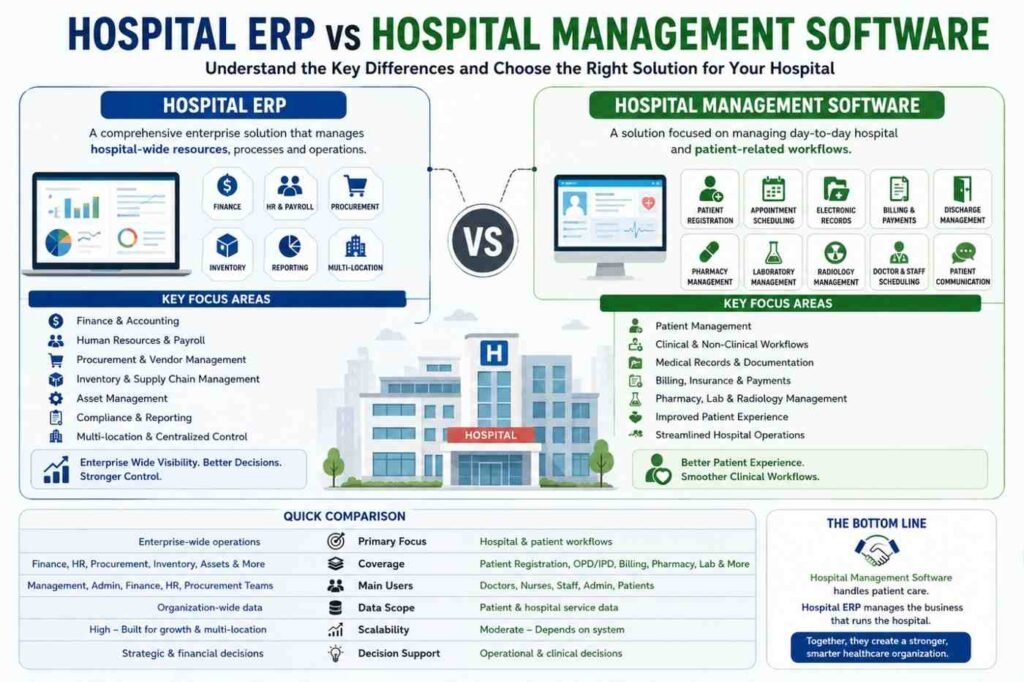
Hospitals manage much more than patients. Behind every appointment, diagnosis, prescription, and discharge is a large operational system involving finance, HR, procurement, inventory, billing, medical records, and administration. Managing all of these processes manually—or through disconnected software—can quickly become complicated.
This is where Hospital ERP and Hospital Management Software come into the picture. Although both solutions help hospitals digitize operations, they are not exactly the same. One primarily focuses on hospital and patient workflows, while the other takes a broader approach to managing enterprise-wide resources.
At KanhaSoft, we often see organizations comparing these two solutions as if they were identical. They are related, but choosing between them requires understanding what each system actually does.
What Is Hospital Management Software?
Hospital Management Software is designed primarily to manage the daily operational and clinical workflows of a healthcare facility. Its goal is to make activities such as patient registration, appointments, billing, medical records, pharmacy operations, and laboratory management more organized.
For example, when a patient visits a hospital, the software can help staff register the patient, schedule an appointment, access medical information, generate bills, manage prescriptions, and coordinate discharge procedures.
Common modules include:
- Patient registration
- Appointment scheduling
- OPD and IPD management
- Electronic medical records
- Doctor and nurse management
- Pharmacy management
- Laboratory management
- Radiology management
- Billing and insurance
- Discharge management
- Patient communication
In simple terms, Hospital Management Software focuses heavily on running hospital workflows efficiently.
It is like having a digital control room for everyday hospital activities—without requiring staff to maintain a mountain of paperwork that somehow always seems to multiply overnight.
What Is Hospital ERP?
Hospital ERP is broader in scope. It is designed to connect different business and operational functions of a healthcare organization through a centralized system.
While Hospital Management Software focuses strongly on patient and clinical workflows, an ERP system can manage areas such as finance, procurement, human resources, inventory, payroll, assets, vendors, and supply chains.
A hospital may use ERP capabilities to manage:
- Finance and accounting
- Human resources
- Payroll
- Procurement
- Inventory
- Vendor management
- Asset management
- Supply chain
- Budgeting
- Compliance
- Reporting and analytics
- Multi-location operations
The primary objective is to connect departments that otherwise operate as separate islands.
For instance, when the procurement department purchases medical supplies, the ERP can connect that transaction with inventory, vendors, accounting, and financial reporting.
This creates a connected operational environment instead of forcing every department to maintain its own version of the truth.
Hospital ERP vs. Hospital Management Software: What Is the Difference?
The easiest way to understand the difference is to look at their primary purpose.
Hospital Management Software primarily manages hospital and patient-related workflows, while Hospital ERP manages broader enterprise resources and business operations across the organization.
Hospital Management Software is generally more patient-centric. Hospital ERP is more enterprise-centric.
However, the distinction can become less obvious because modern healthcare platforms can combine features from both systems. A hospital may also integrate its management software with an ERP platform to create a more connected technology ecosystem.
Key Differences at a Glance
| Area | Hospital Management Software | Hospital ERP |
|---|---|---|
| Primary focus | Patient and hospital workflows | Enterprise-wide resource management |
| Patient management | Strong focus | Usually integrated |
| Clinical workflows | Strong focus | Depends on implementation |
| Finance | Billing and payments | Comprehensive financial management |
| HR | Basic or specialized | HR and payroll management |
| Procurement | Limited or integrated | Comprehensive procurement |
| Inventory | Medical inventory | Enterprise inventory and supply chain |
| Reporting | Operational reports | Enterprise-wide analytics |
| Multi-location support | Depends on system | Stronger centralized management |
| Customization | Varies | Often highly customizable |
| Business planning | Limited | Strong focus |
The important point is that these systems can overlap. The difference is mainly in scope, purpose, and how different departments are connected.
Core Modules of Hospital Management Software
A Hospital Management Software platform can contain several modules depending on the organization’s needs.
Patient Management
This module manages patient registration, profiles, medical history, appointments, and other patient-related information.
Appointment Management
Hospitals can schedule appointments, manage doctor availability, reduce scheduling conflicts, and provide staff with a centralized calendar.
Electronic Medical Records
Medical information can be stored digitally, allowing authorized healthcare professionals to access relevant records when required.
Pharmacy Management
Pharmacy modules can track prescriptions, medicine availability, sales, stock levels, and related transactions.
Laboratory Management
Laboratory workflows can include test requests, sample tracking, results, and reporting.
Billing and Insurance
The system can automate billing, payment tracking, insurance-related workflows, and financial transactions associated with patient services.
Discharge Management
Discharge-related documentation, billing, prescriptions, and other processes can be coordinated through a centralized workflow.
These modules primarily support the day-to-day functioning of healthcare services.
Core Modules of Hospital ERP
Hospital ERP covers a broader operational landscape.
Financial Management
Finance teams can manage accounting, expenses, budgets, payments, financial reports, and other organizational transactions.
Human Resource Management
ERP can manage employee records, attendance, payroll, leave, departments, roles, and workforce-related information.
Procurement Management
Procurement teams can manage purchase requests, approvals, suppliers, purchase orders, and purchasing workflows.
Inventory Management
Hospitals depend on the availability of medicines, equipment, consumables, and other supplies. ERP can provide centralized inventory visibility and automated stock management.
Vendor Management
The system can maintain vendor information, contracts, purchase history, payments, and supplier performance data.
Asset Management
Hospitals often manage expensive medical equipment and infrastructure. ERP can help track assets, maintenance schedules, ownership, and utilization.
Analytics and Reporting
Management teams can access dashboards and reports covering financial performance, inventory, procurement, workforce, and operational activities.
This broader functionality is what makes ERP particularly useful for organizations with complex operational structures.
How Hospital ERP and Hospital Management Software Work Together
Choosing between the two does not always mean selecting one and completely ignoring the other.
In many cases, the better approach is integration.
For example, consider a patient purchasing medicines from the hospital pharmacy.
The Hospital Management Software may record the patient’s prescription and pharmacy transaction. The ERP can then connect relevant financial and inventory information to the broader organization.
The same principle can apply to:
Patient billing → Finance
Medicine usage → Inventory
Purchase orders → Procurement
Employee attendance → HR and payroll
Equipment maintenance → Asset management
This integration reduces duplicate data entry and allows departments to work with connected information.
And honestly, nobody misses entering the same information into three different spreadsheets just because “that’s how we have always done it.”
Hospital ERP vs. Hospital Management Software: Detailed Comparison
1. Business Scope
Hospital Management Software generally concentrates on hospital operations and patient services.
ERP has a wider business scope, covering departments such as finance, HR, procurement, inventory, and administration.
2. Patient-Centric vs. Enterprise-Centric Operations
Hospital Management Software is designed around patient journeys and healthcare workflows.
ERP is designed around organizational resources and processes.
A hospital may therefore use management software to handle a patient’s appointment while using ERP to manage the organization’s payroll, procurement, and financial reporting.
3. Financial Management
Hospital Management Software can handle patient billing, payments, and insurance workflows.
ERP goes further by connecting billing-related information with accounting, expenses, budgets, accounts payable, accounts receivable, and financial reporting.
4. Human Resource Management
Healthcare organizations have doctors, nurses, administrative teams, technicians, support staff, and other employees.
ERP can provide centralized HR capabilities for managing employee information, attendance, payroll, leave, and organizational roles.
5. Inventory and Procurement
A hospital does not only need to know how much inventory is available. It also needs to understand where supplies came from, who supplied them, when they were purchased, what they cost, and when they need to be reordered.
ERP can connect procurement, suppliers, inventory, finance, and approvals into one workflow.
6. Reporting and Analytics
Hospital Management Software can provide operational reports related to patients, appointments, billing, and clinical activities.
ERP can provide broader business intelligence covering financial, workforce, procurement, inventory, and organizational performance.
This gives management teams a more complete view of the business.
7. Multi-Department and Multi-Location Management
A single hospital may manage dozens of departments. A hospital group may manage several facilities.
As complexity increases, centralized ERP capabilities can help organizations maintain consistent processes, reporting, permissions, and resource visibility across locations.
8. Customization and Integration
Every hospital has its own workflows. A system designed for one organization may not perfectly match another.
Custom solutions can integrate hospital systems with accounting software, laboratory platforms, pharmacy systems, HR applications, APIs, and other third-party technologies.
For organizations with complex requirements, working with a custom ERP software development Company can provide greater flexibility than relying entirely on rigid, pre-built workflows.
Which One Does a Hospital Need?
There is no universal answer.
A small hospital with straightforward operations may primarily need Hospital Management Software to handle appointments, patients, billing, pharmacy, and clinical workflows.
A growing hospital with complex finance, HR, procurement, inventory, and administrative requirements may benefit from ERP capabilities.
Large hospital groups and multi-location healthcare organizations may need an integrated ecosystem that combines hospital management functionality with enterprise resource planning.
The right choice depends on:
- Hospital size
- Number of departments
- Number of locations
- Existing software
- Operational complexity
- Integration requirements
- Budget
- Scalability requirements
- Reporting needs
- Customization requirements
The goal should not be to buy the software with the longest feature list. The goal should be to choose technology that solves actual operational problems.
When Should a Hospital Consider Hospital ERP?
Hospitals may consider ERP when they experience challenges such as:
Rapid Organizational Growth
Growth can make existing systems difficult to manage. More employees, departments, suppliers, and transactions create additional complexity.
Multiple Locations
Hospital groups may need centralized financial, inventory, HR, and operational visibility across facilities.
Fragmented Data
If finance has one system, HR has another, procurement uses spreadsheets, and inventory lives somewhere else, connecting the dots becomes unnecessarily difficult.
Procurement Problems
Manual purchase approvals, supplier tracking, and inventory updates can slow down operations.
Financial Visibility Issues
Management needs more than patient billing information. They may also need organization-wide financial reports and budget visibility.
Workforce Management Challenges
Managing a large healthcare workforce manually can become difficult, particularly when multiple departments and shifts are involved.
Increasing Reporting Requirements
ERP can centralize information and make it easier to generate management reports.
Benefits of Hospital ERP
A well-designed ERP implementation can provide several benefits.
Centralized Data
Departments can access relevant information through a centralized platform according to their permissions.
Better Resource Utilization
Management can gain greater visibility into inventory, workforce, assets, and other resources.
Improved Financial Visibility
Finance teams can connect operational transactions with accounting and financial reporting.
Streamlined Procurement
Purchase requests, approvals, suppliers, and purchase orders can follow structured workflows.
Better Inventory Control
ERP can help monitor stock levels, purchases, consumption, and replenishment.
Improved Decision-Making
Centralized information allows management teams to make decisions using broader operational data.
Scalability
A scalable ERP architecture can support additional departments, locations, users, and workflows as the organization grows.
Benefits of Hospital Management Software
Hospital Management Software also offers important benefits.
Improved Patient Experience
Faster registration, appointment management, billing, and communication can improve the overall patient journey.
Reduced Paperwork
Digital workflows reduce dependence on manual records.
Better Department Coordination
Staff can access relevant patient and operational information more efficiently.
Faster Billing
Automated billing workflows can reduce manual calculations and administrative delays.
Better Clinical Workflow Management
Doctors, nurses, laboratories, pharmacies, and other teams can coordinate their activities through connected workflows.
Easier Access to Information
Authorized staff can retrieve relevant records without searching through physical files.
Common Mistakes Hospitals Make When Choosing Software
Selecting healthcare software only because it has a long list of features can be a mistake.
A hospital should also consider how those features actually work together.
Common mistakes include:
- Ignoring integration requirements
- Choosing software without considering future growth
- Underestimating customization needs
- Failing to evaluate data security
- Not involving actual users in software evaluation
- Ignoring staff training
- Choosing based only on initial cost
- Overlooking vendor support
- Treating clinical and business workflows as completely separate
A platform can have hundreds of features and still fail to solve the hospital’s most important problem.
Sometimes, the most useful feature is simply making two departments stop asking each other for the same Excel file.
How to Choose the Right Hospital Software
Before selecting a platform, hospitals should clearly document their requirements.
Step 1: Map Existing Workflows
Understand how patient, financial, HR, inventory, procurement, and administrative processes currently work.
Step 2: Identify Technology Gaps
Determine where manual work, duplicate data, disconnected systems, or reporting problems are creating inefficiencies.
Step 3: Evaluate Integration
Check whether the software can integrate with existing healthcare, financial, laboratory, pharmacy, and third-party systems.
Step 4: Consider Scalability
Think beyond today’s requirements. The system should support future departments, users, locations, and workflows.
Step 5: Evaluate Customization
Hospitals should determine whether workflows, dashboards, reports, permissions, and integrations can be adapted to their requirements.
Step 6: Review Security
Access control, authentication, audit trails, backups, secure integrations, and data protection should be evaluated carefully.
Step 7: Consider Training and Support
Even excellent software can struggle if users do not understand how to use it effectively.
The Role of Customization in Hospital ERP
Healthcare organizations rarely operate in exactly the same way.
One hospital may require a specialized procurement approval workflow. Another may need complex department-level reporting. A hospital group may need centralized management across several locations.
This is where customized ERP development can become valuable.
Organizations can build workflows around their operational requirements instead of forcing every department into a rigid structure.
Customization can include:
- Custom modules
- Role-based dashboards
- Approval workflows
- Custom reports
- Third-party integrations
- API development
- Automated notifications
- Department-specific workflows
- Multi-location management
The objective is not customization for the sake of customization. It is to create a system that fits the organization instead of making the organization constantly work around the system.
Security and Data Management Considerations
Healthcare software deals with sensitive information, so security should be part of the architecture from the beginning.
Hospitals should consider:
- Role-based access control
- Secure authentication
- Data encryption
- Audit logs
- Backup and recovery
- Secure APIs
- Permission management
- Monitoring and logging
- Data retention policies
- Compliance requirements
Access should be based on job responsibilities. A finance employee does not necessarily need access to clinical records, just as a clinician may not need access to every financial report.
Good healthcare software makes the right information available to the right person without making everything available to everyone.
The Future of Hospital ERP and Management Software
Healthcare technology is moving toward more connected and intelligent systems.
Future platforms are likely to incorporate:
- AI-powered analytics
- Predictive inventory management
- Automated administrative workflows
- Intelligent workforce planning
- Real-time dashboards
- Cloud-based infrastructure
- Mobile applications
- API-driven integrations
- Predictive maintenance
- Automated reporting
AI can help organizations analyze large amounts of operational information, identify patterns, and support better decision-making.
However, technology should remain practical. Hospitals do not need AI simply because the acronym looks impressive in a presentation. They need technology that solves real problems.
Conclusion
Hospital ERP and Hospital Management Software may sound like two names for the same technology, but their purposes are different.
Hospital Management Software primarily focuses on patient care workflows and day-to-day hospital operations. Hospital ERP takes a broader approach by connecting finance, HR, procurement, inventory, assets, administration, and other organizational resources.
For smaller organizations, a focused hospital management platform may be enough. For growing hospitals and healthcare groups, integrated ERP capabilities can provide the centralized visibility and scalability needed to manage increasing complexity.
Ultimately, the best healthcare technology is not the platform with the most buttons, dashboards, or impressive feature list. It is the system that connects the right processes, gives the right people the right information, and helps the hospital spend less time managing software—and more time managing what actually matters.
Frequently Asked Questions
What is the main difference between Hospital ERP and Hospital Management Software?
Hospital Management Software primarily manages patient and hospital workflows, such as appointments, medical records, billing, pharmacy, and laboratory operations. Hospital ERP covers broader organizational functions such as finance, HR, procurement, inventory, and resource planning.
Is Hospital ERP better than Hospital Management Software?
Not necessarily. The right solution depends on the hospital’s size, operational complexity, departments, existing technology, and future growth requirements.
Can Hospital ERP include Hospital Management Software features?
Yes. Depending on the platform and implementation, ERP can include or integrate healthcare-specific modules for patient management, billing, pharmacy, laboratory operations, and other hospital workflows.
Do small hospitals need an ERP system?
Not always. Smaller hospitals with relatively simple operations may only require Hospital Management Software. ERP becomes more valuable when financial, HR, procurement, inventory, and administrative processes become more complex.
Can Hospital ERP integrate with existing hospital systems?
Yes. ERP platforms can integrate with healthcare systems, accounting applications, laboratory systems, pharmacy platforms, HR software, and other third-party solutions through APIs and integration services.
Is Hospital ERP suitable for multi-location hospitals?
Yes. ERP can provide centralized management for finance, HR, procurement, inventory, reporting, and other resources across multiple facilities.
Can Hospital ERP be customized?
Yes. Depending on the development approach, ERP can be customized with specific modules, workflows, dashboards, permissions, reports, integrations, and automation features.
How does Hospital ERP improve hospital operations?
Hospital ERP can connect departments, centralize organizational information, automate administrative workflows, improve inventory and procurement visibility, streamline financial management, and support data-driven decisions.
What should hospitals consider before implementing ERP software?
Hospitals should evaluate requirements, existing workflows, integrations, scalability, security, customization, implementation costs, training, support, and long-term maintenance.
What is the role of a Hospital ERP development partner?
A development partner can analyze hospital workflows, design the ERP architecture, develop customized modules, integrate existing systems, implement automation, and provide ongoing technical support.
What’s up, I log on to ykur neww stuff regularly. Yoour humoristic style is witty, keesp it up!
xnxx